How to Improve Your Research Paper RAG Chatbot: Code Snippets for Smarter Retrieval
Introduction
So, you’ve built a basic Retrieval-Augmented Generation (RAG) chatbot. It’s a powerful tool, but when you start feeding it dense, technical documents like research papers, you quickly hit its limits.
Maybe you’re seeing some of these common issues:
- It pulls up text chunks that are only vaguely related to the query.
- It can’t connect the dots between different papers.
- You find yourself correcting the same mistakes over and over.
- The answers feel generic, or worse, completely made up.
If that sounds familiar, you’re in the right place. This guide is a hands-on, code-focused walkthrough to fix these problems.
We’ll go through incremental, easy-to-implement code snippets to sharpen your bot’s retrieval accuracy. By the end, you’ll have clear “Before vs. After” comparisons that show the real-world impact of each improvement, turning your simple chatbot into a much smarter research assistant.

Prerequisites
Before we dive in, let’s get our environment set up. You should have a working Python environment with the following libraries installed. We’re using LangChain, Streamlit, and Groq for fast inference, but the principles here are transferable to other stacks.
pip install streamlit langchain langchain-groq langchain-community pypdf faiss-cpu rank-bm25 sentence-transformers chromadb
You’ll also need an API key from Groq to get this running.
Baseline: A Simple Streamlit Research Paper Chatbot
Let’s start with a standard, functional Streamlit application. This is our foundation. It lets a user plug in their API key, upload a PDF, and then it chunks, embeds, and stores the text in a FAISS vector store for retrieval.
Here’s the rundown of its parts:
- API Key Management: A simple input in the Streamlit sidebar.
- Load: PyPDFLoader to read the uploaded PDF.
- Split: RecursiveCharacterTextSplitter to break the document into manageable chunks.
- Embed: HuggingFaceEmbeddings to create vector representations locally.
- Store: FAISS for a local, in-memory vector database.
- Memory: ConversationBufferMemory to remember chat history for follow-up questions.
- Chain: ConversationalRetrievalChain to manage the whole Q&A process. The retriever inside this chain is what we’ll be upgrading.
- LLM: ChatGroq for fast language model inference with Llama 3
Chatbot code-https://github.com/ratneshdagli/DocQna_CHATBOT
Baseline Output Example:
- Query: “What is the core idea of the RAG paper?”
- Basic Answer: “Retrieval-Augmented Generation (RAG) is a model that combines a retriever with a generator to answer questions. The retriever finds relevant documents, and the generator uses them to create an answer.”
It’s not wrong, but it’s pretty shallow. We can do much better.
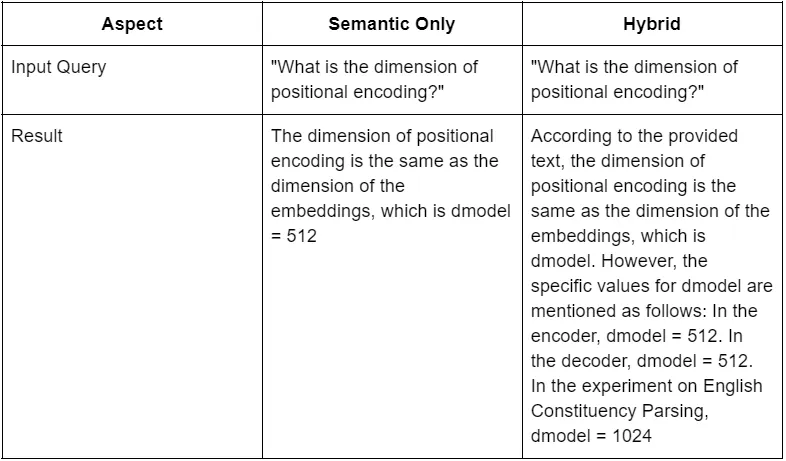
Improvement 1: Hybrid Retrieval (Keyword + Semantic Search)
Method: At the heart of a RAG system is retrieval, and there are two main ways to tackle it. Each has its own blind spots.
- Semantic Search (The Concept Librarian): This is the modern RAG workhorse. It uses embeddings to understand the meaning of your text. You ask a conceptual question, and it finds text that means the same thing, even with different words. It’s powerful, but sometimes it’s too fuzzy and can glide right past a critical, specific formula or term.
- Keyword Search (The ‘Ctrl+F’ Assistant): This is old-school, literal search. It finds the exact characters you typed. It’s perfect for pulling up a specific function name or a person’s name. The downside? It has zero understanding of context.
Research papers are a mix of complex ideas and precise, literal terms. Relying on just one of these methods is a losing game. The fix is Hybrid Retrieval — using both at the same time to get the best of both worlds.
Purpose: This technique drastically improves the retrieval of exact phrases and terminology that pure semantic search often misses, without losing the ability to understand broader concepts.
Code Snippet:
# 1. Initialize BM25 (keyword) retriever from your documents
bm25_retriever = BM2Retriever.from_documents(splits)
# 2. Initialize your standard vector store retriever (e.g., from FAISS)
# faiss_retriever = ...
# 3. Initialize Ensemble Retriever to combine them
ensemble_retriever = EnsembleRetriever(
    retrievers=[bm25_retriever, faiss_retriever],
    weights=[0.5, 0.5]
)
Chatbot_link-https://github.com/ratneshdagli/DocQna_CHATBOT
Before vs. After:
Improvement 2: HyDE for Better Query Understanding
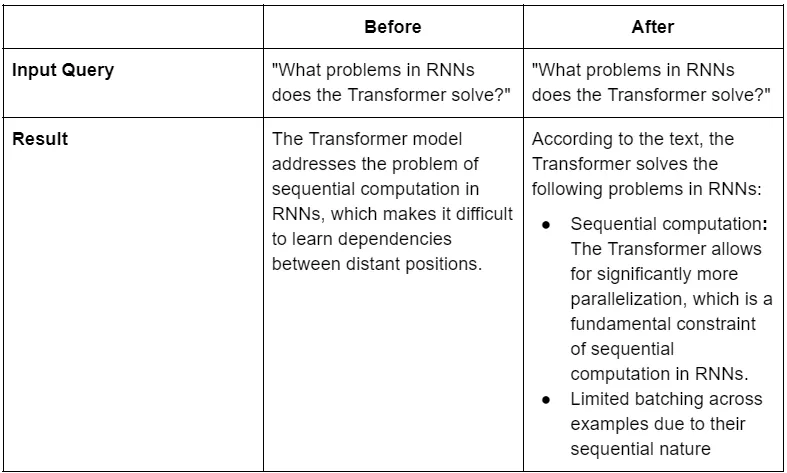
Method: Here’s a classic RAG problem: the “vocabulary mismatch.” A user asks a simple question like, “why do GANs fail?”, but the answer is buried in a dense paragraph using technical language like “generator sample diversity reduction.” The chatbot looks for the user’s simple phrase and comes up empty.
HyDE (Hypothetical Document Embeddings) is a clever workaround. Instead of searching with the user’s short query, it flips the script:
- Generate a Fake Answer: It first sends the user’s query to an LLM with a prompt like: “Generate a perfect, textbook-style answer to this question, even if you have to make something up.”
- Use the Fake Answer to Search: The LLM produces a detailed paragraph packed with the kind of keywords and technical phrases you’d expect to find in the real document. The chatbot then uses this hypothetical answer to do the semantic search.
- Find the Real Answer: This hypothetical answer is a much better “lure” for finding the actual, relevant paragraphs in the source document because it speaks the same language.
It’s like asking a librarian for a book you only vaguely remember. The librarian imagines what the book’s full summary might be, uses that to search the catalog, and it leads them right to the real thing.
Making HyDE Safer
A word of caution, though. This technique can backfire if the LLM’s hypothetical answer is plausible but wrong. To use it safely:
- Set low temperature: Use temperature=0 in your LLM call to keep the output factual and less creative.
- Limit output tokens: Keep the hypothetical document short and to the point.
- Never show the HyDE document: This is a tool for retrieval, not a source of truth. It should never be shown to the user.
Purpose: HyDE transforms a short user query into a rich, hypothetical document that’s more likely to match the style and content of the source material, leading to better search results
Code Snippet:
from langchain_core.prompts import ChatPromptTemplate
from langchain_core.output_parsers import StrOutputParser
from langchain_groq import ChatGroq
# 1. Initialize a "safer" LLM for HyDE generation
hyde_llm = ChatGroq(temperature=0, model_name="llama3-8b-8192")
# 2. Create a prompt to generate a hypothetical answer
hyde_template = """Even if you do not know the answer, please generate a plausible answer to the following question.
Question: {question}
Answer:"""
hyde_prompt = ChatPromptTemplate.from_template(hyde_template)
# 3. Create a chain to generate the hypothetical document
hyde_chain = hyde_prompt | hyde_llm | StrOutputParser()
# 4. Use the output of hyde_chain to retrieve documents
# retrieved_docs = retriever.get_relevant_documents(hyde_chain.invoke(query))
Chatbot_link-https://github.com/ratneshdagli/DocQna_CHATBOT
Improvement 3: Metadata Filtering
Method: This next technique is less about a fancy algorithm and more about good old-fashioned organization. Think of it this way: imagine a library where none of the books have labels on their spines. To find a book from after 2020, you’d have to pull every single one off the shelf. That’s what a basic RAG system does.
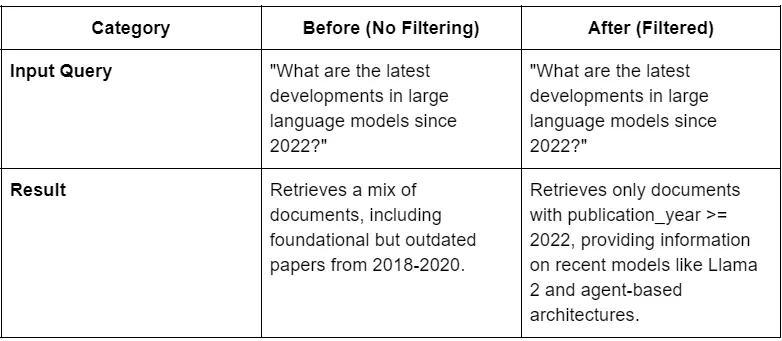
Metadata is the solution — it’s the label on the spine that gives you the title, author, and publication year. By attaching these labels to every chunk of text we process, we can perform pre-filtering. When a user asks, “What are the latest developments… since 2022?”, the system can instantly ignore every chunk from a document with a publication_year before 2022.
Important Note: Here’s the catch, though: your standard FAISS vector store can’t do this. You need a vector database that does. A great, lightweight option to start with is ChromaDB. The code below shows how to use it.
Purpose: This allows the chatbot to narrow its search to only the most relevant documents before doing the expensive vector search, making it faster and far more accurate.
Code Snippet:
First, you add metadata when creating documents. Then, you use a vector store like Chroma that can use it in a filter
from langchain.docstore.document import Document
from langchain_community.vectorstores import Chroma
# 1. First, add metadata when you create your documents
docs_with_metadata = []
for split in splits:
    new_doc = Document(
        page_content=split.page_content,
        metadata={
            "publication_year": 2023,
            "author": "Vaswani et al."
        }
    )
    docs_with_metadata.append(new_doc)
# 2. Create a Chroma vector store with the new documents
vectorstore = Chroma.from_documents(docs_with_metadata, embeddings)
# 3. Then, use the filter directly in the retriever call
retriever = vectorstore.as_retriever(
    search_kwargs={'filter': {'publication_year': {'$gte': 2022}}}
)
Chatbot_link-https://github.com/ratneshdagli/DocQna_CHATBOT
Before vs. After:
Improvement 4: Multi-Hop Reasoning (Comparing Papers)
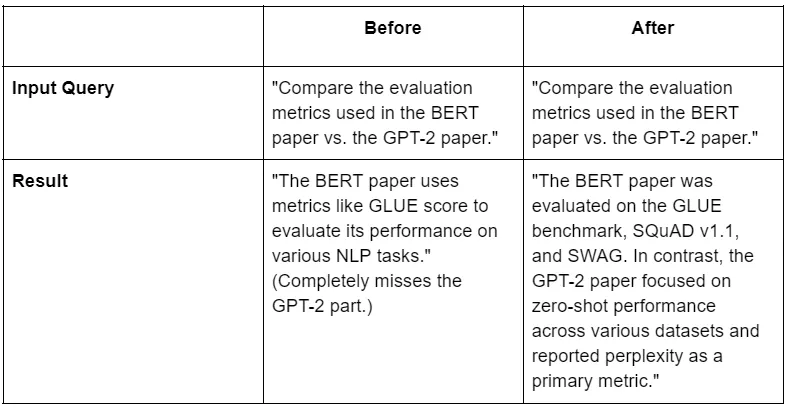
Method: A basic RAG system has a one-track mind. If you ask a complex question like “Compare the pros of apples to the cons of oranges,” it’s likely to just search for “apples” and call it a day, completely ignoring the second half of your question.
This is where multi-hop reasoning comes in. It teaches the chatbot to think like a researcher. It breaks a big, complex question into smaller, manageable pieces, finds the answer to each one, and then combines that knowledge to form a complete, final answer. Here’s how it works:
- Decompose (The Planner): The system first uses an LLM as a “planner.” It looks at the complex query (“Compare BERT vs. GPT-2”) and creates a to-do list of simple, standalone questions, like:
- “What are the evaluation metrics for the BERT paper?”
- “What are the evaluation metrics for the GPT-2 paper?”
2. Retrieve in Parallel (The Interns): It then sends out “interns” to find the info for each simple question at the same time. One intern looks for BERT’s metrics, another looks for GPT-2’s.
3. Synthesize (The Lead Researcher): Finally, all the retrieved information is handed to a “lead researcher” (another LLM call). This final step takes all the separate pieces of context and writes a single, coherent answer that directly addresses the user’s original, complex query.
The code snippet below shows how to build the “Planner” (Step 1). A full implementation would then need to execute a retrieval for each of those questions and feed the combined results into a final prompt for synthesis.
Purpose: This gives the chatbot the ability to answer complex, comparative questions that a single search pass could never handle.
Code Snippet:
This snippet shows the first step of generating sub-questions. A full implementation requires chaining these steps together.
from langchain_core.output_parsers import JsonOutputParser
from langchain_core.prompts import ChatPromptTemplate
# 1. Chain to generate sub-questions from the original query
sub_question_template = """
You are a helpful assistant who generates stand-alone questions from a complex user query.
Generate a JSON object containing a list of 2-3 sub-questions...
User Query: {query}
"""
sub_question_prompt = ChatPromptTemplate.from_template(sub_question_template)
sub_question_chain = sub_question_prompt | llm | JsonOutputParser()
# 2. Invoke chain to get sub-questions.
# sub_questions = sub_question_chain.invoke({"query": original_query})['questions']
# 3. The next step is to create a more complex chain that:
#    a. Runs the sub_question_chain.
#    b. For each generated sub-question, runs your retriever.
#    c. Gathers all retrieved documents.
#    d. Passes the original query and all documents to a final prompt for synthesis.
Chatbot_link-https://github.com/ratneshdagli/DocQna_CHATBOT
Before vs. After:
Conclusion
So there you have it. We’ve walked through a series of upgrades to take our baseline RAG bot from a simple retriever to a much more sophisticated research assistant.
We’ve combined keyword and semantic search for precision, used HyDE to bridge the vocabulary gap between user and document, filtered results with metadata for relevance, and enabled multi-hop reasoning to tackle complex questions.
Next Steps:
Where do you go from here? The real fun is in experimenting.
- Try adding different kinds of metadata, like section titles or figure captions.
- Play with the weights in the EnsembleRetriever to see what works best for your documents.
- Build out a more permanent solution for a failure-memory loop.
Future Directions:
And if you want to push things even further, you could explore automated table extraction, linking citations between documents, or generating structured JSON summaries instead of plain text. The possibilities are wide open.
✍️ Written By

Ratnesh Dagli
Author • Researcher • Engineer